


Malware is one of the biggest threats in everyday digital life. Whether it is your computer, smartphone or tablet, malware can affect any internet-enabled device. The situation becomes especially critical when cybercriminals gain access to sensitive data such as passwords, online banking login credentials, or payment information. For this reason, it is important to know how malware works and how you can protect yourself from it.
The good news is that With the right knowledge and a few simple safety measures, you can significantly reduce the risk of infection.
This article explains what malware is, the different types of malicious software, how it gets on your devices, and how to effectively protect yourself against it.
What is malware?
The term malware is a combination of the words malicious and software and refers to any type of malicious software designed to harm devices or their users.
Malware has different goals depending on the type. For example, it can:
- steal personal data and passwords,
- read bank or payment information,
- control devices remotely,
- encrypt files and demand a ransom,
- display unwanted advertising or
- impair a device's performance.
It is no longer just computers that are affected. Smartphones, tablets and other networked devices can also be infected with malware.
How does malware get on your device?
Malware usually doesn't install itself. Cybercriminals often trick their victims into downloading harmful files or clicking on dangerous links. For this reason, it is important to know the most common attack vectors.
Phishing
Sending phishing emails is one of the best-known methods. At first glance, the messages appear legitimate and seem to originate from banks, authorities, parcel services, or well-known companies. The goal is to trick you into opening a harmful attachment or link.
Smishing
Smishing involves an attack via text message or a messaging app that concerns an urgent matter, such as an allegedly blocked account. You will often be asked to click on a link – for example, to confirm an account or to track a shipment. However, these messages often conceal a fake website or malware.
Vishing
With vishing (voice phishing), scammers contact you by phone. For example, they might pretend to be employees of your bank or a technical support team and try to persuade you to install software or disclose confidential information.
They often use caller ID spoofing in order to have a trusted phone number appear on your display.
Fake QR codes
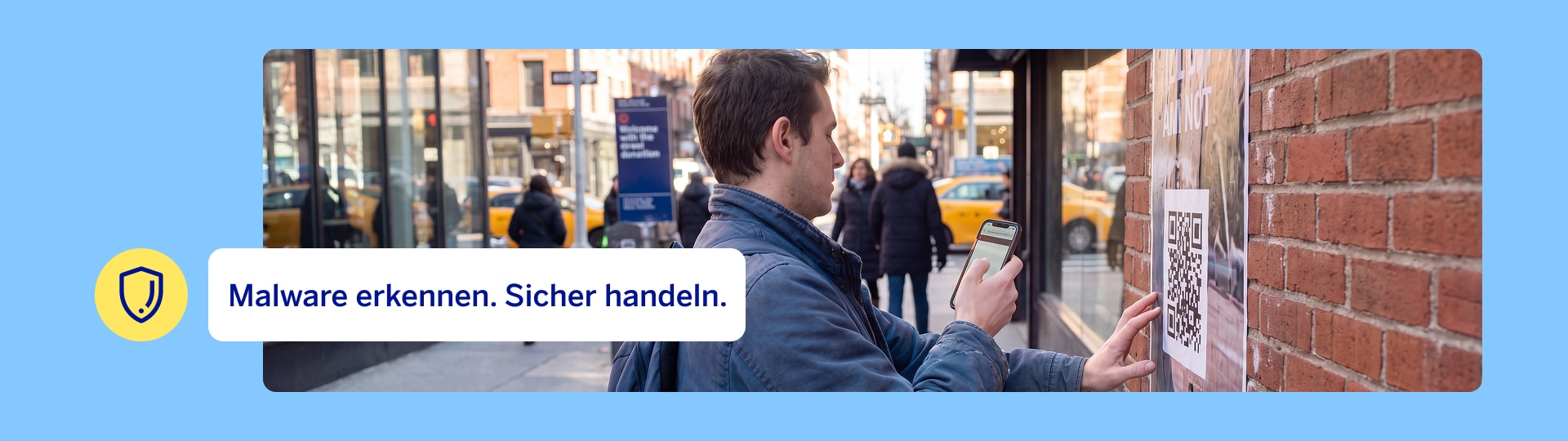
QR codes can also be misused. With so-called squishing, you are redirected to a fraudulent website after scanning a QR code, or you unknowingly download a harmful file. For this reason, you should always check where a QR code leads you to.
Malware in apps
Apps from unofficial sources pose a higher risk. For this reason, you should only download applications from official app stores such as Google Play or the Apple App Store.
Manipulated websites and advertising
Some websites or advertisements contain harmful content. Even a single click can lead to malware being downloaded or personal data being stolen.
Your security comes first
What are the different types of malware?
Not all malware works the same way. The different types of malware vary depending on the method being used and the goal.
Trojan
A Trojan disguises itself as a useful program or a harmless file. After installation, it often grants attackers undetected access to your device.
Spyware
Spyware collects information about you without you even noticing. This includes, for example, passwords, browsing behavior, or other personal data that is subsequently passed on to third parties.
Keyloggers
Keyloggers record all keyboard input. This allows cybercriminals to steal login credentials, credit card information, or other sensitive data.
Ransomware
Ransomware is one of the most dangerous forms of malware. It encrypts your files or even the entire system and then demands a ransom for releasing the data. Security authorities generally advise against complying with such demands.
Adware
Adware displays unwanted advertising or changes your browser settings. Although it is generally considered less dangerous, it can compromise your privacy and reduce your device's performance.
Rogueware
Rogueware masquerades as an antivirus program or security software. It claims your device is infected and tries to get you to download programs at your expense or enter personal data.
How can you recognize a malware infection?
Not every infection is immediately visible. However, there are some warning signs you should watch out for.
Common signs include:
- Your device is working significantly slower than usual.
- Programs or apps crash regularly.
- The available storage space suddenly decreases.
- Unknown programs or apps appear without you having done anything.
- Your browser's homepage or search engine has changed.
- An unusually large number of pop-ups or advertisements are displayed.
- You frequently receive error messages.
- Your antivirus program has been deactivated or is no longer working properly.
If several of these symptoms occur simultaneously, you should thoroughly inspect your device.
This is how you protect yourself against malware
With a few simple measures, you can significantly reduce the risk of infection.
Keep your devices up to date
Install updates for your operating system, your browser and your apps as soon as possible. Security updates close known vulnerabilities that could be exploited by cybercriminals.
Only download apps from official sources.
Use only the Google Play Store or the Apple App Store. Also pay attention to ratings, the number of downloads, and the developer's name.
Use antivirus or antimalware software
An up-to-date security solution identifies many threats during the download process. or before they can cause damage. Perform a full malware scan regularly and keep your software up to date.
Be careful with emails and messages
Do not open any attachments or links from unexpected or suspicious messages. Carefully check the sender and question unusual requests, even if the message seems trustworthy at first glance.
Only enter sensitive data at trusted websites
Always check the internet address and make sure that you are indeed at the official website. Avoid clicking on links in emails or text messages that lead to websites where you are asked to enter personal data.
Regularly create backups
Regularly back up important files on an external hard drive or in a trustworthy cloud storage. This way you can recover your data even after a ransomware attack.
Use strong passwords and two-factor authentication
For every online account use a unique, secure password and activate the two-factor authentication wherever it is offered. This makes it significantly more difficult for attackers to access your accounts.
Exercise extra caution when banking online
Only use the official banking app for online banking or go to the bank webpage via the internet address you are familiar with.
Never share TANs, passwords or approval codes via phone or email.
Regularly check your account activity and immediately report any unusual transactions to your bank.
Activate security features such as push notifications for account transactions, provided your bank offers this service.
What should you do if you suspect you have malware on your device?
If you suspect that your device has been infected, you should react quickly.
- Disconnect your device from the internet if possible.
- Perform a full malware scan using up-to-date security software.
- Install all available security updates.
- Change important passwords, especially for your email account, online banking and other services that involve sensitive data.
- Monitor your accounts for unusual activity and inform your bank or the respective provider if necessary.
If you suspect that malware may have gained access to your online banking or payment details, then change your login credentials immediately using a secure device and inform your bank. This enables further protective measures to be implemented if necessary.
Summary
Malware is constantly evolving and is one of the biggest risks in everyday digital life. Whether it is Trojans, spyware or ransomware, malware can cause significant financial and personal damages.
However, you can effectively protect yourself by being cautious with emails, downloads and apps, as well as by regularly updating, backing up and using up-to-date antivirus or antimalware software. Even a few simple security measures can significantly improve the protection of your devices and personal data against cyberattacks.
Frequently Asked Questions about Malware

More than 82 million people worldwide trust us with their banking.
Others also found interesting
-
5 security features in the BBVA App that ensure secure banking
Discover 5 of the BBVA App's security features: turning your card on and off, managing card features, securely authorizing transactions, using discreet mode and immediately reporting fraud.