



What is caller ID spoofing, and how can you protect yourself?
Scammers often use so-called caller ID spoofing, which involves changing their caller ID. This causes the name or BBVA's real number to appear on your display. The goal is to create a false sense of security so that you disclose your passwords or text message codes.
To prevent you from walking into a trap, we confirm every call directly in the BBVA App. This allows you to immediately check the origin of the call.
This is how your BBVA call verification works
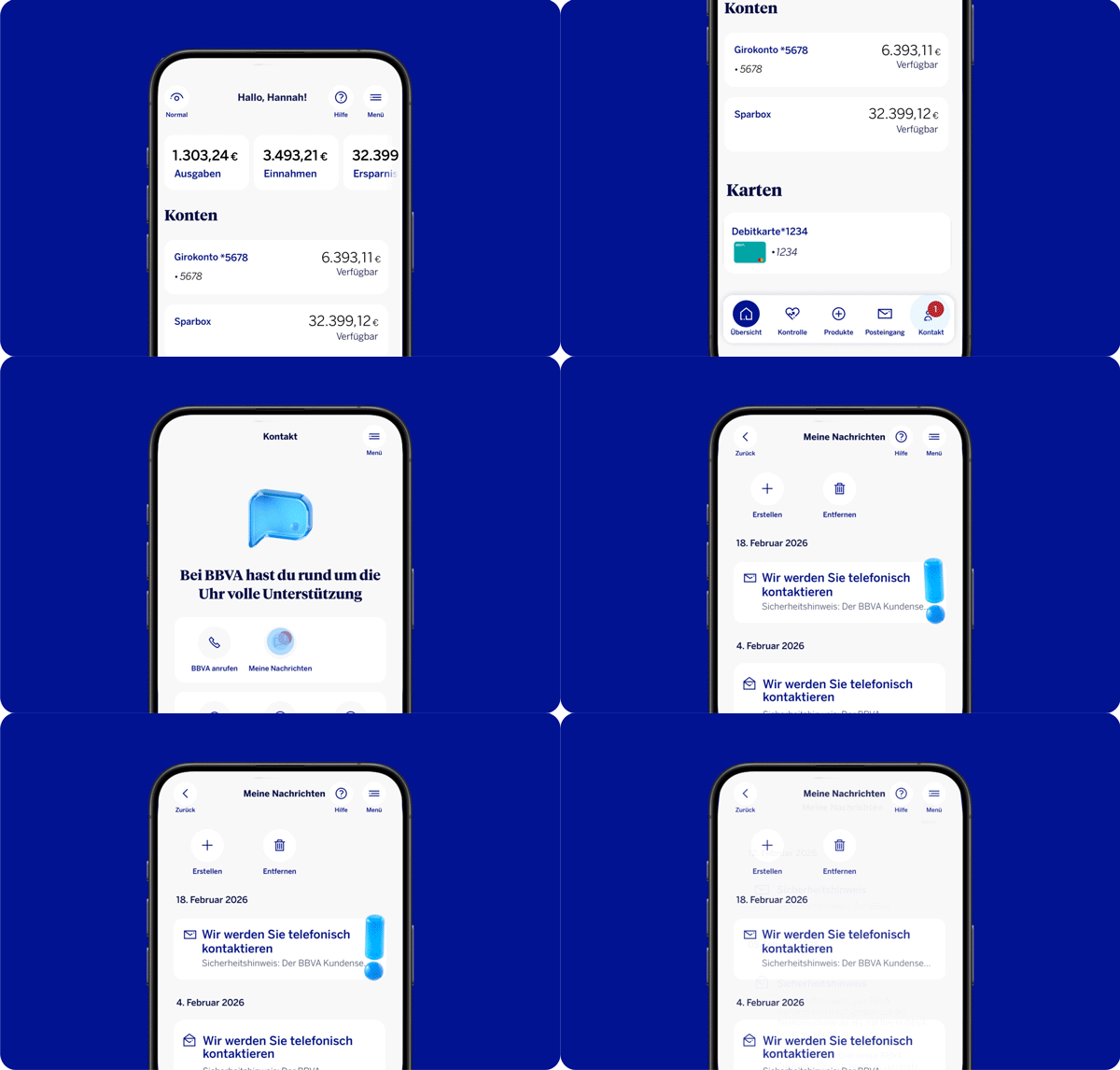
When we call you, you'll also receive a notification in the "My Messages" section in the BBVA App. This way you can immediately recognize that it is really a call from BBVA.
Where can you find the notification?
- Log in to the BBVA App using your login credentials.
- Tap "Contact" in the bottom-right corner.
- Open “My Messages.”
- There you will see a message that says: “Safety notice: BBVA Customer Service is currently calling the phone number linked to your BBVA account."
Why you should activate your notifications
To ensure that this feature protects you effectively, we recommend activating push notifications for the BBVA App.
Here's how:
- Go to your smartphone's settings.
- Select the BBVA App.
- Activate the "Notifications" option.
This way you'll see the verification notification immediately when we call you. It's easy and secure.
Your security comes first
Your checklist: Prevention is the best protection
Technology is your bodyguard, but you still need to pay attention. If no confirmation appears in the BBVA App, or if something seems strange to you, please be careful.
Our golden rules for you:
- Never share sensitive data: We will never ask you for your PIN, passwords, or text message codes over the phone.
- No spontaneous transfers: Never make money transfers that you are asked to do during a phone call.
- When in doubt, hang up. End the call immediately and contact us through BBVA's official channels.

More than 82 million people worldwide trust us with their banking.
Others also found interesting
-
Change your password today
On this promotion day we will show why strong passwords will be more important than ever in 2026 – and provide you with 6 pro tips for truly secure passwords.